
Help
Delete your Addie account.
How to delete your account in the Addie app.
How to delete your account
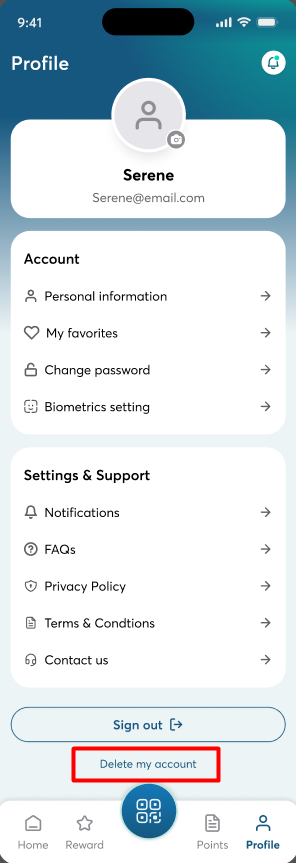
Go to the Profile screen in the Addie app, and tap Delete my account, located below Sign out.
What happens next
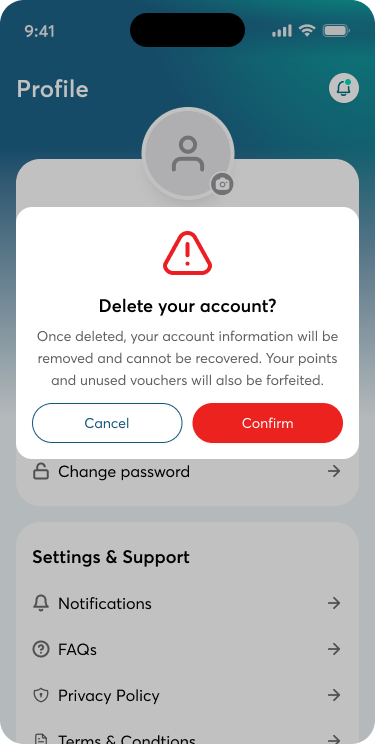
- A confirmation dialog explains that your account information will be permanently removed and can't be recovered, and that any remaining points and vouchers will be forfeited.
- You tap Cancel to keep your account or Confirm to continue.
- When you confirm, your account and all your personal data are deleted permanently and immediately, not just deactivated.
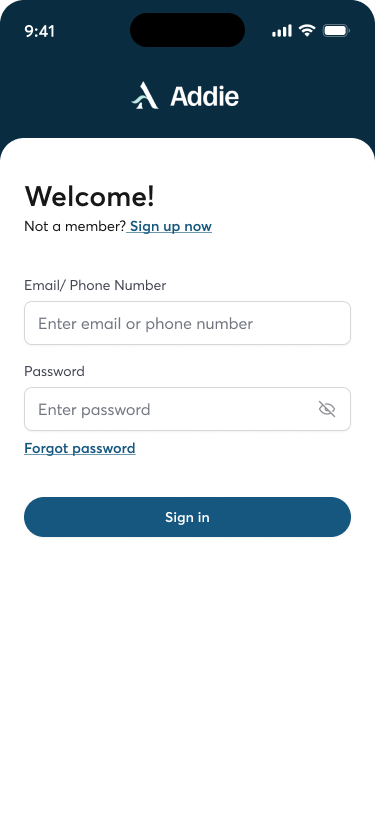
- You are signed out automatically and taken to the Sign in screen.
- The deleted credentials can no longer be used to sign in.
Step by step
Step 1
Open Profile and tap "Delete my account"
Tap the Profile tab in the bottom navigation bar (far right).
Scroll to the bottom of the Profile screen. Below the "Sign out" button, tap the "Delete my account" link (highlighted in red in the screenshot).
Step 2
Confirm the deletion
A confirmation dialog appears with the title "Delete your account?" and this message: "Once deleted, your account information will be removed and cannot be recovered. Your points and unused vouchers will also be forfeited."
Tap Cancel to close the dialog and keep your account, or tap Confirm to permanently delete it.
Step 3
Deletion completed
After your account is successfully deleted, the message "Your account has been deleted" is displayed on the screen, and you are automatically signed out.
The app returns to the Sign in screen.
Questions about deleting your account or your personal information? See the privacy policy and the member terms and conditions, or contact support.